High Resolution 4 Channel Car DVR Recorder With Automatic
Identification System
4 Channel Car DVR Recorder Description
- Power Led, electricity, light, when the system is in standby state,
the power indicator lights flashing;
Status Led, electricity, light, when the system is recording, the
power indicator lights flashing. This product
is the normal input voltage is 12V/24V.
(2) trigger line and manual keys can select the image in any way
4-way camera
(3)In Trigger state, hand the keys effectively. When you press the
manual key "Quad" of  or
or button,
the trigger is invalid, Undo "QUAD" trigger to be effective
(4) After triggering undo, image delay three seconds, and enters
the standby state.
(5) the trigger condition, no priority, when the trigger line when
more than two trigger, then the trigger line
corresponding channel full-screen image,only three seconds, and
then jumps automatically split image screen.
(6) can connect up to four cameras, and automatically split video
screen
(7) car camera powered by the device for easy wiring
(8) DVD navigation screen display is triggered by the "red line"
switching equipment, wiring and display convenience
(9) Each image can be set to forward / mirroring respectively; RCA
connectors can be configured to connect DVD
4 Channel Car DVR Recorder Technical parameters
| Name | Panoramic mobile recorder |
| Video system | PAL/NTSC(automatic identification system, attention, connect the
camera before power on, The equipment support hybrid system) |
| Video parameters | Resolution 720×576, 25FPS, Vp-p:1.0V, impedance: 75Ω |
| Video Interface | 4 inputs (RCA connector), 1 outputs (RCA connector) |
| Video Recording | TF Card (less than 64G), the video format is AV |
| Audio Interface | 1 inputs and 1 outputs (Reservation function) |
| Auto picture mode | Wire: High Trigger / Remote |
| Mirror | OFF/ON |
| Power Consumption | hosts running: 2W; power-saving mode: 1W |
| Output power | 12V / 1A (camera power supply) |
| Rated voltage | DC 12V/24V |
| Working temperature | 0℃-+55℃ |
| N.W. | 150g |
| Size | 91*53*23mm (L * W * H) |
the screen mode
★Auto Mode introduces :( numbers represent the corresponding camera
channel number, the channel number is not shown)
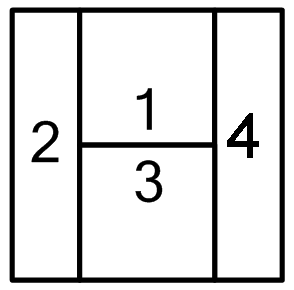 When connected to four cameras, camera work after the car starts,
the screen automatically displays Quad mode, automatically shut
down after a delay of 5 seconds.
When connected to four cameras, camera work after the car starts,
the screen automatically displays Quad mode, automatically shut
down after a delay of 5 seconds.
 When connected to three cameras, the camera work after the car
starts, the screen automatically displays three Split mode,
automatically shut down after a delay of 5 seconds.
When connected to three cameras, the camera work after the car
starts, the screen automatically displays three Split mode,
automatically shut down after a delay of 5 seconds. When connected to two cameras, camera work after the car starts,
the screen automatically displays Dual split mode, automatically
shut down after a delay of 5 seconds.
When connected to two cameras, camera work after the car starts,
the screen automatically displays Dual split mode, automatically
shut down after a delay of 5 seconds. Forward Looking trigger boot, depending on Full screen before the
show, trigger an automatic shutdown of the exit delay 3 seconds.
Forward Looking trigger boot, depending on Full screen before the
show, trigger an automatic shutdown of the exit delay 3 seconds. After triggering a front or reverse power, turn left, turn left
light trigger Full display screen for 3 seconds after the
resumption of the automatic segmentation of video images.
After triggering a front or reverse power, turn left, turn left
light trigger Full display screen for 3 seconds after the
resumption of the automatic segmentation of video images. After triggering a front or reverse power, turn right at lights,
turn right trigger Full display screen for 3 seconds to return to
automatic segmentation of video images.
After triggering a front or reverse power, turn right at lights,
turn right trigger Full display screen for 3 seconds to return to
automatic segmentation of video images. Reverse trigger on, linked to reverse gear reversing Full screen
display, shut down automatically after hanging reverse gear delayed
for 3 seconds,
Reverse trigger on, linked to reverse gear reversing Full screen
display, shut down automatically after hanging reverse gear delayed
for 3 seconds,
★On-off system and Manual mode introduced:
1. Short press  or long press (more than 1 second) SMT button boot, showing
automatic segmentation of images,again, a short press or for a long time to press the SMT button to shutdown, the system
enters standby mode, but the system still in the recording.
or long press (more than 1 second) SMT button boot, showing
automatic segmentation of images,again, a short press or for a long time to press the SMT button to shutdown, the system
enters standby mode, but the system still in the recording.
2. long press the SMT button to boot, short press button to switch
image mode.
★ Host box with high integration technology, four cameras
centralized power supply box by the host, thereby greatly reducing
the tedious wiring during installation, in addition to four cameras
captured the image signal after the hosts converted by a video
cable and the navigation DVD of "AV" port connection
4 Channel Car DVR Recorder Wiring Diagram Installation

<DIP switch>
★ mirror DIP switch: 4 switches, achieve about Mirror: dial-up ON,
mirroring; OFF Just dial down. As default.
★ Parking DIP switch: a switch (fifth), to dial ON, system startup
power loss protection, voltage is not enough, the system
automatically dial down dormancy; OFF, power loss protection
cancel.
To achieve parking video surveillance, proposed to ON state.
Four-core trigger line description
Four-wire:
Line 1 (Green) is a front view of the trigger line, you can access the Front
 Office assist lamp or other neutral switch,When triggered,
the system boot, revoked, the system standby
Line 2 (white) left, as the trigger line, then turn left at light positive
(when the electric pen test twinkling).When the trigger,
automatic full screen display,
Line 3 (yellow) to reverse the trigger line, then reversing light positive,
When triggered, the system boot, when withdrawn,
system standby,
Line 4 (blue) to the right, as the trigger lines (sparking when electric
pen test) then turn right at lights positive,When triggered,
automatic full screen

The use of video recording:
- Before using TF card format: TF card is inserted, power boot into
POST mode (display
automatically turns off after five seconds into standby) by remote
control Red Dot Button is on, press
ESC or Red Dot Stop recording (The default boot automatically start
recording), press the "MENU"
button to enter the first page of the menu, press again to switch
SETUP menu page, select
FORMAT, press the "REC or Red Dot ”,Press the left and right
buttons to select EXECUTE,
press "ESC or Red Dot ” Formatting.
( 2 ) Modify the system date and time: Press the "MENU" button to
enter the menu, press the switch to
the SETUP menu page, select DATE INPUT again, press "REC or Red Dot
”Key to enter the interface,
press the "left" or "right" key to switch to the SET, press "REC or
Red Dot "Button to enter the date and
time by switching the left and right, press" MENU "button to
confirm and switch, press" REC
or Red Dot "Button to confirm, press the" MENU "to exit.
( 3 ) Playback: Press "ESC or Red Dot "Stop video playback again,
press“ Red Dot ”Key to enter the Playback
menu, press the "left" or "right" button to select the video file,
press "REC or Red Dot "Button to select
the playback, press the" MENU "button to fast forward.
P.S.Blue background is selected, the yellow background is not
selected.
Parking Monitor Description
Parking monitoring starting voltage must be greater than 12.5V (car
batteries generally 13-14V), then the battery power, and a fifth
DIP switch to dial up sign Parking REC
This product has a power loss protection, voltage less than 11.5V
off automatically enter the sleep state, when the voltage is
restored back to normal will automatically open parking video
surveillance state.
Frequently Asked Questions
Question 1: SMD Tact switch function?
A: Long press (more than 1 second), the device starts to work,
automatic image display screen (the default screen is H), long
press again, the device enters the standby state; (Note: Press 1
second, the device starts, but Car navigation display screen
response time takes about 1 second.)
Short press (less than 1 second), single-screen and "field" screen
to cycle;
Question 2: 4 trigger lines how to wire?
A: Line 1 (Green) is a front view of the trigger wire, before the
next depending on the assist lamp or other neutral switch place;
the 2nd line (white) left, as the trigger line, then turn left
positive light; the 3rd line (yellow) to reversing trigger line,
then reversing light positive; Line 4 (blue) to the right, as the
trigger line, then turn right at lights positive
Question 3: How to connect car navigation screen?
A: The device video output line connected car navigation screen,
reverse video input port, the red line equipment output port
connected to the reversing vehicle navigation screen test line,
some car navigation screen video input is automatically detected,
so reversing the test line can be removed.
Question 4: Why is there no output device?
A: Please check whether the device POWER Power lamp blinks, and if
yes, then the device into standby mode, the output is off, press
the power switch on the remote control or press the patch trigger
switch device is turned on, POWER light long bright, video output
device.
Question 5: Why dial left or right turn lamp lights, equipment no
image?
A: The equipment in standby mode, dial left or right turn lamp
lights, is not shown, because the normal driving, the driver will
often toggle turn signal, if activated every time the screen
display, it will affect the driver's driving safety a. If you
intend to observe the situation around, press and touch switch or
remote control to open the key.