Intelligent Control 4 Channel Car DVR Recorder For Bus Taxi Truck
Vehicle
4 Channel Car DVR Recorder User’s Manual
First of all, thank you very much for using our Panoramic mobile
recorder!
The system for your car blind spot image perspective, for your safe
driving escort. Enjoy driving, driving without a blind spot to
experience the feeling of no dead ends.
This high-end car parking system combined with the owners driving
habits developed a cost-effective automotive safety products more
suited to the owners use.
This parking system is based on road conditions the driver's
operating habits, manual and automatic control of the video
analysis is displayed.
The role and function of parking system
★Quad intelligent parking system installation does not destroy the
original car circuit, will not affect the safety car circuit, does
not affect the vehicle warranty 4S shop situation.
★ This product has a front, left side, as the right side, rear four
functions, the driver can according to the required driving
environment, monitoring the situation around the car; two with
automatic and manual control mode, when the factory default
automatic mode.
4 Channel Car DVR Recorder Technical parameters
| Name | 4 Channel Car DVR Recorder |
| Video system | PAL/NTSC(automatic identification system, attention, connect the
camera before power on, The equipment support hybrid system) |
| Video parameters | Resolution 720×576, 25FPS, Vp-p:1.0V, impedance: 75Ω |
| Video Interface | 4 inputs (RCA connector), 1 outputs (RCA connector) |
| Video Recording | TF Card (less than 64G), the video format is AV |
| Audio Interface | 1 inputs and 1 outputs (Reservation function) |
| Auto picture mode | Wire: High Trigger / Remote |
| Mirror | OFF/ON |
| Power Consumption | hosts running: 2W; power-saving mode: 1W |
| Output power | 12V / 1A (camera power supply) |
| Rated voltage | DC 12V/24V |
| Working temperature | 0℃-+55℃ |
| N.W. | 150g |
| Size | 91*53*23mm (L * W * H) |
the screen mode
★Auto Mode introduces :( numbers represent the corresponding camera
channel number, the channel number is not shown)
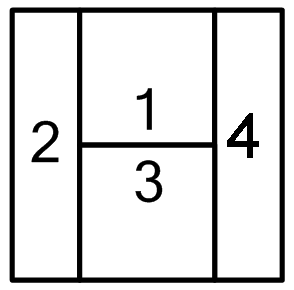 When connected to four cameras, camera work after the car starts,
the screen automatically displays Quad mode, automatically shut
down after a delay of 5 seconds.
When connected to four cameras, camera work after the car starts,
the screen automatically displays Quad mode, automatically shut
down after a delay of 5 seconds.
 When connected to three cameras, the camera work after the car
starts, the screen automatically displays three Split mode,
automatically shut down after a delay of 5 seconds.
When connected to three cameras, the camera work after the car
starts, the screen automatically displays three Split mode,
automatically shut down after a delay of 5 seconds. When connected to two cameras, camera work after the car starts,
the screen automatically displays Dual split mode, automatically
shut down after a delay of 5 seconds.
When connected to two cameras, camera work after the car starts,
the screen automatically displays Dual split mode, automatically
shut down after a delay of 5 seconds. Forward Looking trigger boot, depending on Full screen before the
show, trigger an automatic shutdown of the exit delay 3 seconds.
Forward Looking trigger boot, depending on Full screen before the
show, trigger an automatic shutdown of the exit delay 3 seconds. After triggering a front or reverse power, turn left, turn left
light trigger Full display screen for 3 seconds after the
resumption of the automatic segmentation of video images.
After triggering a front or reverse power, turn left, turn left
light trigger Full display screen for 3 seconds after the
resumption of the automatic segmentation of video images. After triggering a front or reverse power, turn right at lights,
turn right trigger Full display screen for 3 seconds to return to
automatic segmentation of video images.
After triggering a front or reverse power, turn right at lights,
turn right trigger Full display screen for 3 seconds to return to
automatic segmentation of video images. Reverse trigger on, linked to reverse gear reversing Full screen
display, shut down automatically after hanging reverse gear delayed
for 3 seconds,
Reverse trigger on, linked to reverse gear reversing Full screen
display, shut down automatically after hanging reverse gear delayed
for 3 seconds,
★On-off system and Manual mode introduced:
1. Short press  or long press (more than 1 second) SMT button boot, showing
automatic segmentation of images,again, a short press or for a long time to press the SMT button to shutdown, the system
enters standby mode, but the system still in the recording.
or long press (more than 1 second) SMT button boot, showing
automatic segmentation of images,again, a short press or for a long time to press the SMT button to shutdown, the system
enters standby mode, but the system still in the recording.
2. long press the SMT button to boot, short press button to switch
image mode.
★ Host box with high integration technology, four cameras
centralized power supply box by the host, thereby greatly reducing
the tedious wiring during installation, in addition to four cameras
captured the image signal after the hosts converted by a video
cable and the navigation DVD of "AV" port connection
Wiring Diagram Installation

<DIP switch>
★ mirror DIP switch: 4 switches, achieve about Mirror: dial-up ON,
mirroring; OFF Just dial down. As default.
★ Parking DIP switch: a switch (fifth), to dial ON, system startup
power loss protection, voltage is not enough, the system
automatically dial down dormancy; OFF, power loss protection
cancel.
To achieve parking video surveillance, proposed to ON state.
The use of video recording:
- Before using TF card format: TF card is inserted, power boot into
POST mode (display
automatically turns off after five seconds into standby) by remote
control Red Dot Button is on, press
ESC or Red Dot Stop recording (The default boot automatically start
recording), press the "MENU"
button to enter the first page of the menu, press again to switch
SETUP menu page, select
FORMAT, press the "REC or Red Dot ”,Press the left and right
buttons to select EXECUTE,
press "ESC or Red Dot ” Formatting.
( 2 ) Modify the system date and time: Press the "MENU" button to
enter the menu, press the switch to
the SETUP menu page, select DATE INPUT again, press "REC or Red Dot
”Key to enter the interface,
press the "left" or "right" key to switch to the SET, press "REC or
Red Dot "Button to enter the date and
time by switching the left and right, press" MENU "button to
confirm and switch, press" REC
or Red Dot "Button to confirm, press the" MENU "to exit.
( 3 ) Playback: Press "ESC or Red Dot "Stop video playback again,
press“ Red Dot ”Key to enter the Playback
menu, press the "left" or "right" button to select the video file,
press "REC or Red Dot "Button to select
the playback, press the" MENU "button to fast forward.
P.S.Blue background is selected, the yellow background is not
selected.
Parking Monitor Description
Parking monitoring starting voltage must be greater than 12.5V (car
batteries generally 13-14V), then the battery power, and a fifth
DIP switch to dial up sign Parking REC
This product has a power loss protection, voltage less than 11.5V
off automatically enter the sleep state, when the voltage is
restored back to normal will automatically open parking video
surveillance state.